
How Credits Are Used on Waikay
How Credits Are Used on Waikay
A complete guide to reports, report updates, prompt tracking, model selection, tracking frequency, and monthly plan allowances.
Understanding Waikay credits
Waikay uses a credit based system so that each subscription can be allocated across reporting and Prompt Tracking according to the user’s priorities. Some actions have a fixed credit cost, while Prompt Tracking has a variable monthly cost.
Reports and report updates are straightforward: each action uses one credit. Prompt Tracking is calculated from the number of selected language models, whether those models are tracked through API or scraped mode, and how frequently each prompt is checked.
1 credit
Create one Brand Overview Report or one Topic Report
1 credit
Update any existing report
Variable
Track prompts based on models, tracking mode, and frequency
Your monthly credit allowance can be shared between report creation, report updates, and Prompt Tracking. A credit used for one activity reduces the balance available for the others.
Waikay plans and monthly credits
Each subscription level includes a set number of credits per month:
| Plan | Monthly price | Included credits |
|---|---|---|
| Level 1 | $24.95/month | 8 credits |
| Level 2 | $69.95/month | 30 credits |
| Level 3 | $199.95/month | 90 credits |
| Level 4 | $449.95/month | 220 credits |
The right plan depends not only on how many reports you intend to create, but also on the number of prompts, models, and tracking frequencies required for ongoing monitoring.
Credits used for reports
Creating a report
Waikay offers Brand Overview Reports and Topic Reports. Both report types use credits in exactly the same way.
One Brand Overview Report equals 1 credit. One Topic Report equals 1 credit.
| Action | Credits used |
|---|---|
| Create one Brand Overview Report | 1 credit |
| Create one Topic Report | 1 credit |
| Create three Topic Reports | 3 credits |
| Create one Brand Overview Report and four Topic Reports | 5 credits |
Updating a report
Every update of an existing report also uses one credit, whether the report is a Brand Overview Report or a Topic Report.
Every report update equals 1 credit.
How credits work in Prompt Tracking
Prompt Tracking uses a variable monthly credit calculation. Each prompt can have a different cost because the configuration can be adjusted independently. Three elements determine the monthly cost.
Number of AI models selected
Selecting more models increases the cost because the prompt must be run separately for each selected model.
API mode or scraped mode
API and scraped models use different per-model rates.
Tracking frequency
Weekly, every two days, or daily.
Available API and scraped models
| API models | Scraped models |
|---|---|
| Gemini, ChatGPT, Sonar, Claude | AI Mode, ChatGPT-S, Gemini-S, Copilot |
Prompt Tracking credit matrix
The following matrix converts the interface examples into a per-model monthly credit rate.
| Tracking frequency | Per API model | Per scraped model |
|---|---|---|
| Weekly | 0.25 credits/month | 0.05 credits/month |
| Every 2 days | 1.00 credit/month | 0.20 credits/month |
| Daily | 2.00 credits/month | 0.40 credits/month |
API models use five times as many credits as scraped models at the same frequency. Daily tracking also costs eight times as much as weekly tracking for the same model.
Inside the Prompt Tracking interface
The Prompt Ideas screen is where model selection and tracking frequency turn into a live monthly cost, prompt by prompt.
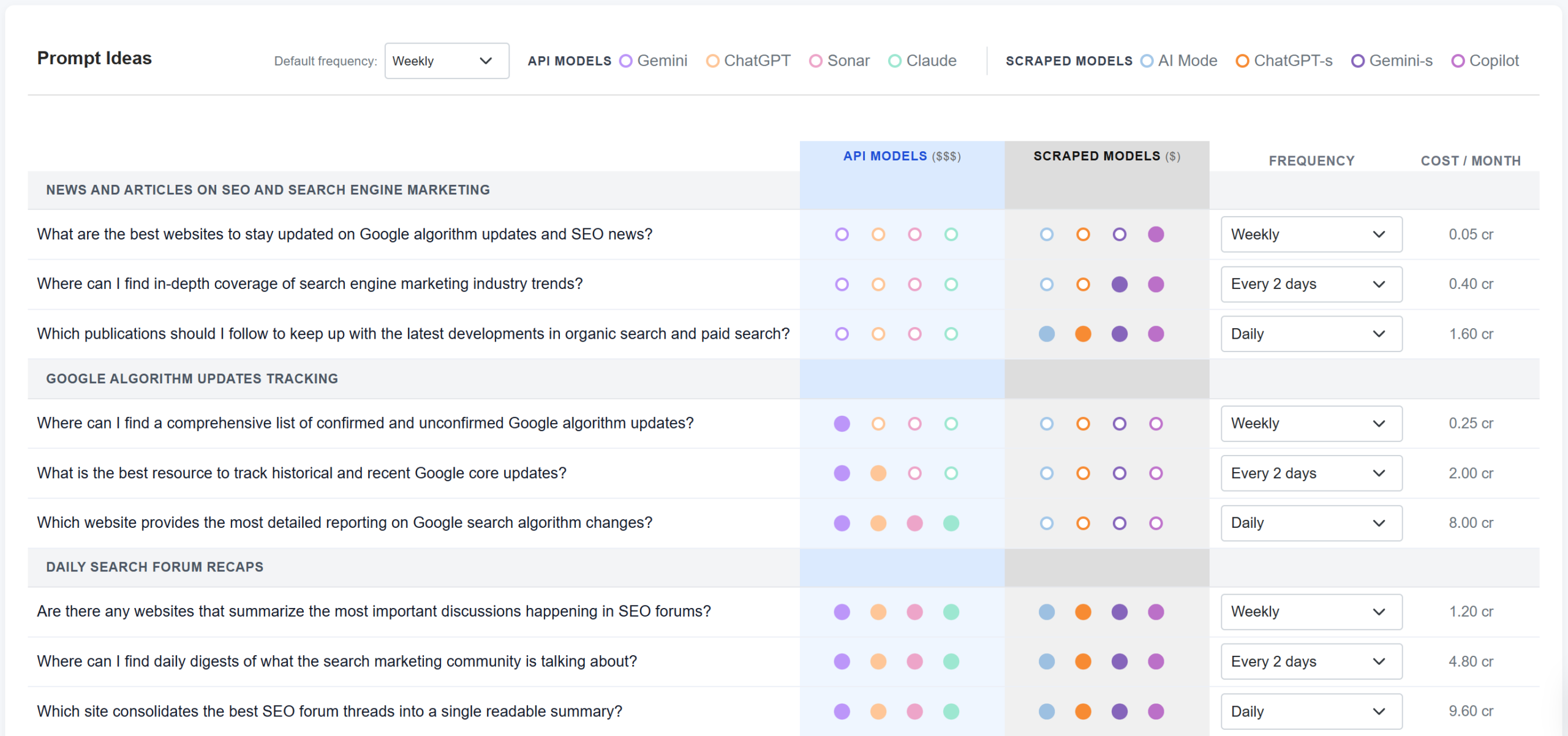
Figure 1. The Prompt Ideas screen, with model toggles, frequency, and cost per prompt.
At the top of the screen, a default frequency dropdown sets the starting cadence for new prompts, and a legend shows the four API models (Gemini, ChatGPT, Sonar, Claude) and the four scraped models (AI Mode, ChatGPT-s, Gemini-s, Copilot), each with its own colour.
Below that, prompts are grouped under topic clusters, such as news and articles on SEO, Google algorithm updates tracking, or daily search forum recaps. Each row is one prompt idea, followed by two blocks of coloured dots: one for the API models and one for the scraped models. A filled dot means that model is switched on for that prompt; an outlined dot means it is not selected.
Each row also has its own frequency dropdown and a cost per month figure, shown in credits. This is where the per-model, per-frequency rates from the credit matrix turn into a real number: switch on more models, or track more often, and the cost per prompt rises accordingly.
Grouping prompts by topic makes it easy to set a lighter, weekly cadence for broad discovery prompts while reserving daily or every-2-days tracking, and a wider model mix, for the handful of prompts that matter most.
The Prompt Tracking calculation
For each prompt, calculate the API portion and scraped portion separately, then add them together.
(Number of API models × API rate) + (number of scraped models × scraped rate)
| Frequency | Formula |
|---|---|
| Weekly | (API models × 0.25) + (scraped models × 0.05) |
| Every 2 days | (API models × 1.00) + (scraped models × 0.20) |
| Daily | (API models × 2.00) + (scraped models × 0.40) |
Prompt Tracking examples
These examples show how the matrix works for common configurations. All totals are monthly costs for one prompt.
Example 1
1 scraped model, weekly
Calculation: 1 × 0.05
0.05 credits/month
Example 2
2 scraped models, every 2 days
Calculation: 2 × 0.20
0.40 credits/month
Example 3
4 scraped models, daily
Calculation: 4 × 0.40
1.60 credits/month
Example 4
1 API model, weekly
Calculation: 1 × 0.25
0.25 credits/month
Example 5
2 API models, every 2 days
Calculation: 2 × 1.00
2.00 credits/month
Example 6
4 API models, daily
Calculation: 4 × 2.00
8.00 credits/month
Mixed API and scraped configurations
Example 7
4 API + 4 scraped, weekly
(4 × 0.25) + (4 × 0.05) = 1.00 + 0.20
1.20 credits/month
Example 8
4 API + 4 scraped, every 2 days
(4 × 1.00) + (4 × 0.20) = 4.00 + 0.80
4.80 credits/month
Example 9
4 API + 4 scraped, daily
(4 × 2.00) + (4 × 0.40) = 8.00 + 1.60
9.60 credits/month
Prompt Tracking comparison table
| Models selected | Frequency | Monthly credit cost |
|---|---|---|
| 1 scraped model | Weekly | 0.05 |
| 2 scraped models | Every 2 days | 0.40 |
| 4 scraped models | Daily | 1.60 |
| 1 API model | Weekly | 0.25 |
| 2 API models | Every 2 days | 2.00 |
| 4 API models | Daily | 8.00 |
| 4 API + 4 scraped models | Weekly | 1.20 |
| 4 API + 4 scraped models | Every 2 days | 4.80 |
| 4 API + 4 scraped models | Daily | 9.60 |
Calculating the cost of several prompts
The monthly Prompt Tracking cost is calculated separately for every prompt and then added together. Consider a project with the following configuration.
Five prompts
Tracked weekly on two scraped models
Three prompts
Tracked weekly on one API model
One prompt
Tracked daily on all four API models
| Prompt group | Calculation | Credits/month |
|---|---|---|
| 5 prompts × 2 scraped models weekly | 5 × (2 × 0.05) | 0.50 |
| 3 prompts × 1 API model weekly | 3 × (1 × 0.25) | 0.75 |
| 1 prompt × 4 API models daily | 1 × (4 × 2.00) | 8.00 |
| Total Prompt Tracking cost | 0.50 + 0.75 + 8.00 | 9.25 |
Any reports created or updated during the same month would use additional credits from the same allowance.
Combining reports and Prompt Tracking
Credits can be distributed across Waikay’s features according to the user’s priorities. For example, a Level 2 customer receives 30 credits per month and could allocate them as follows.
| Activity | Credits |
|---|---|
| Create one Brand Overview Report | 1 |
| Create five Topic Reports | 5 |
| Update three reports | 3 |
| Track five prompts weekly across all eight model options | 6 |
| Remaining credits | 15 |
| Total monthly allowance | 30 |
In this example, each of the five prompts costs 1.20 credits per month because it is tracked weekly across four API and four scraped models. Five prompts therefore use six credits.
Choosing the right tracking frequency
A good Prompt Tracking setup does not necessarily use the same frequency for every prompt. Higher priority prompts can be checked more often, while broader monitoring prompts can use a lower cost schedule.
| Frequency | Best suited to | Trade-off |
|---|---|---|
| Weekly | Long-term visibility monitoring, broad brand discovery, stable topics, and large prompt sets | Lowest credit use, but less sensitive to short-term changes |
| Every 2 days | Important commercial prompts, active campaigns, competitor monitoring, and moderately changeable topics | A balance between responsiveness and cost |
| Daily | High-priority prompts, launches, time-sensitive campaigns, and answers that need close monitoring | Fastest insight, but the highest credit use |
Track a smaller set of strategic prompts daily, use every-two-days tracking for important commercial prompts, and keep broader supporting prompts on a weekly schedule.
Choosing between API and scraped tracking
API tracking runs the prompt through a model’s API. Scraped tracking captures results from supported live AI interfaces. These are different tracking methods, and a prompt can use one method or a combination of both.
A prompt can therefore be tracked only through API models, only through scraped models, or across a mixed set of models. The monthly estimate shown in Waikay updates according to the selected models and frequency.
How to manage credits efficiently
Prioritise high-impact prompts
Use daily tracking for prompts that directly influence revenue, campaigns, launches, or reputation.
Use weekly for broad monitoring
Weekly tracking suits informational prompts where trend direction matters more than daily movement.
Select only relevant models
Choose models that are relevant to the market or audience being monitored.
Plan report updates deliberately
Every refresh uses one additional credit.
Review the monthly cost before scaling up
Check the displayed estimate before applying a large model set or increasing the tracking frequency.
Key points to remember
| Action or configuration | Credit use |
|---|---|
| Create one Brand Overview Report | 1 credit |
| Create one Topic Report | 1 credit |
| Update any report | 1 credit |
| One scraped model tracked weekly | 0.05 credits/month |
| One API model tracked weekly | 0.25 credits/month |
| All 8 model options tracked weekly | 1.20 credits/month per prompt |
| All 8 model options tracked daily | 9.60 credits/month per prompt |
Reports have a fixed cost. Prompt Tracking is flexible: the cost rises with the number of models and the tracking frequency. By mixing model coverage and schedules, users can build a monitoring setup that fits their monthly credit allowance.
Pricing and credit allocations in this guide reflect the plan information supplied at the time of preparation.
