Your clients are asking what you are doing about ChatGPT. Here is how to answer them.
Somewhere in your client list, a marketing director has typed their own company name into ChatGPT, read what came back, and is now wondering why nobody on the agency side has mentioned it. Waikay is the tool that lets you get there first.
It works like this. Pick a prospect. Spend two credits (roughly $5) and ten minutes. Waikay asks ChatGPT, Gemini, Claude and Perplexity what they know about that business, compares the answers with what the company says about itself on its own website, and lists what each model got wrong, left out, or gave to a competitor instead.$5
Two credits, one prospect overview and one topic audit
10 min
From prospect to findings
4
AI models compared
The service, in six steps
Most agencies we talk to are not short of AI opinions. They are short of a repeatable thing to sell. This is the sequence that works, and each step maps to a screen in Waikay.
Step 01
Win the pitch with a $3 audit
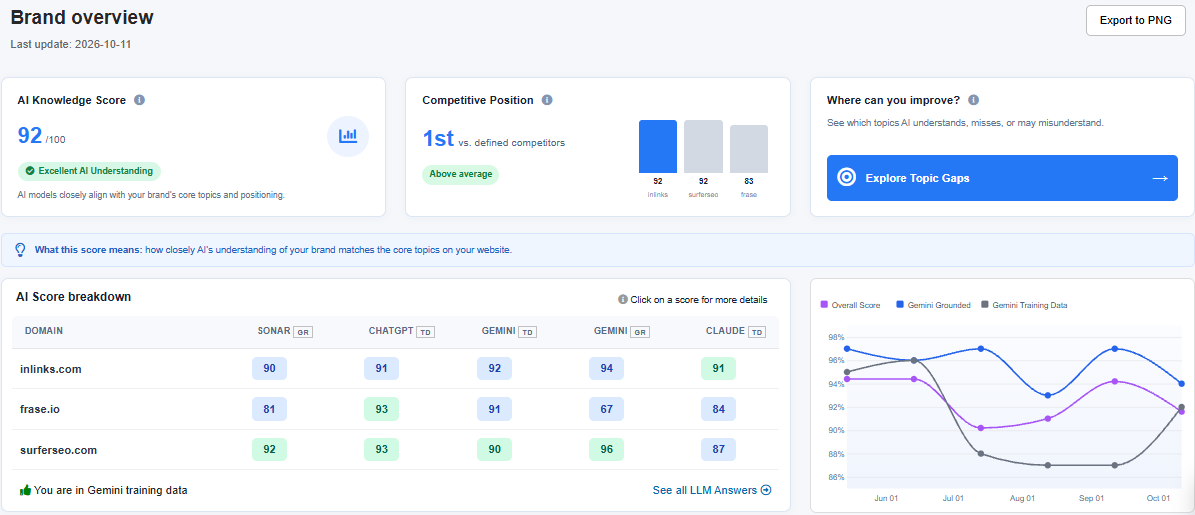
The screenshot above is our own company. The score says how closely the AI models’ understanding of InLinks matches what our website actually says: 92 out of 100, and higher than the two competitors we chose to be measured against. Underneath, each model is scored separately, because Gemini and ChatGPT rarely agree.
Run the same report on a prospect. One credit for the Brand Overview, one more for a Topic Report on the service they most want to be known for. In practice you will spend less than the cost of a coffee and come away with the following:
- A single number the prospect’s board will understand, and a ranking against the competitors they actually care about.
- The topics AI associates with them, and the ones it does not.
- The competitor that is better represented on each topic, by name.
- A first draft of what to fix, ranked.
In the pitch meeting
That is a different pitch meeting. You are not explaining why AI search matters; you are showing them a screenshot of Gemini preferring their competitor. It works just as well on existing clients, where it is the cheapest way we know to open a conversation about a new retainer.
Step 02
Find what AI gets wrong about them
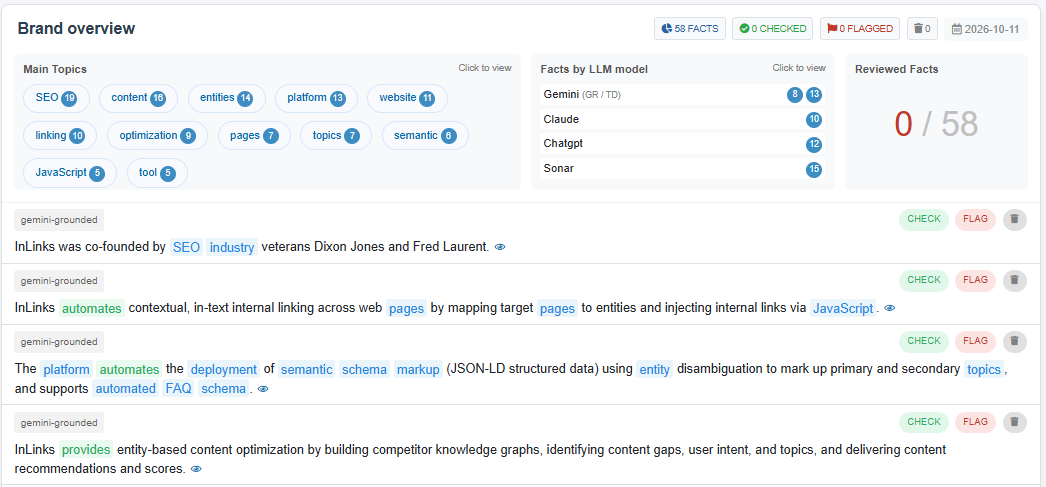
Here is the same company again, this time in the Fact Tracker. The models have made 58 separate factual claims about InLinks, from who founded it to how its JavaScript works, and at the point of the screenshot we had reviewed none of them. The green ones are the first few that happen to be right. Some will not be: a founder’s name, a feature that was retired, a price from two years ago.
Every wrong claim is a conversation a prospect is having without you. The Fact Tracker lists each one by model, with the source the model leant on, and lets you mark it true, false or unsupported. The false ones become the client’s first action list, and you have the evidence in a single screenshot rather than a slide about “reputation risk”.
Fixing the errors
Fixing them is ordinary marketing work: correct the page the model is quoting, publish the fact the model is missing, get the third-party source updated. Waikay tells you which of those three you are dealing with.
Step 03
Turn the gaps into a content plan you can defend
Anyone can paste a URL into ChatGPT and ask for content ideas. The result looks convincing and you cannot explain to a client where any of it came from.
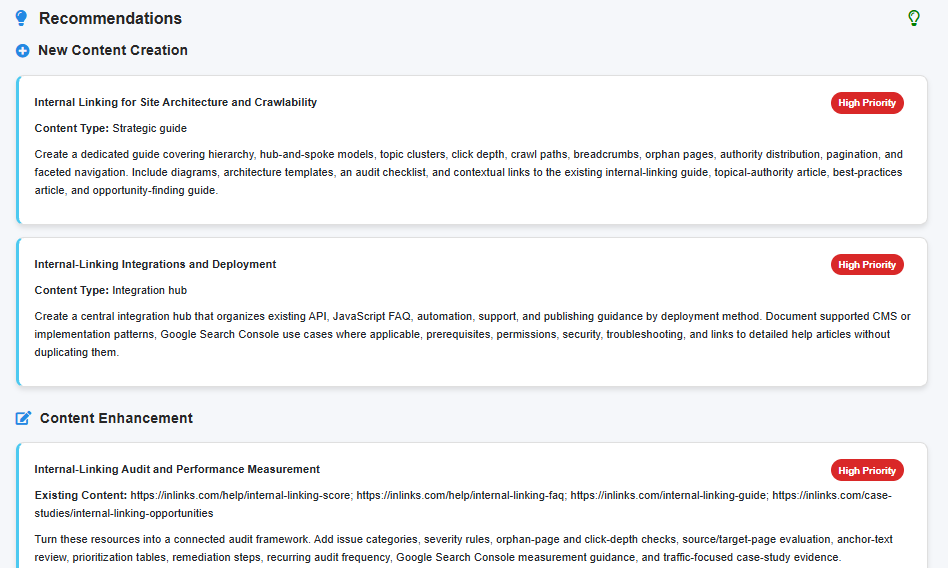
Waikay’s Topic Reports start from a knowledge map of the client’s own pages: the entities, concepts and relationships that define what they do. It then compares that map with what each AI model says when asked about the topic, and with the two competitors you named. The gap between the three is the plan.
The screenshot shows the result for one of our own topics. Each recommendation says what type of content it is, why it is a priority, and what it should cover. You can see the data behind every line, and so can the client. When they ask “why this page and not that one?” you have an answer that is not “the AI suggested it”.
Sharing the plan
Action plans export to PDF, PNG or a read-only link that needs no Waikay login, so the version you present is the version in the tool.
Step 04
Know who AI trusts in their market before you start outreach
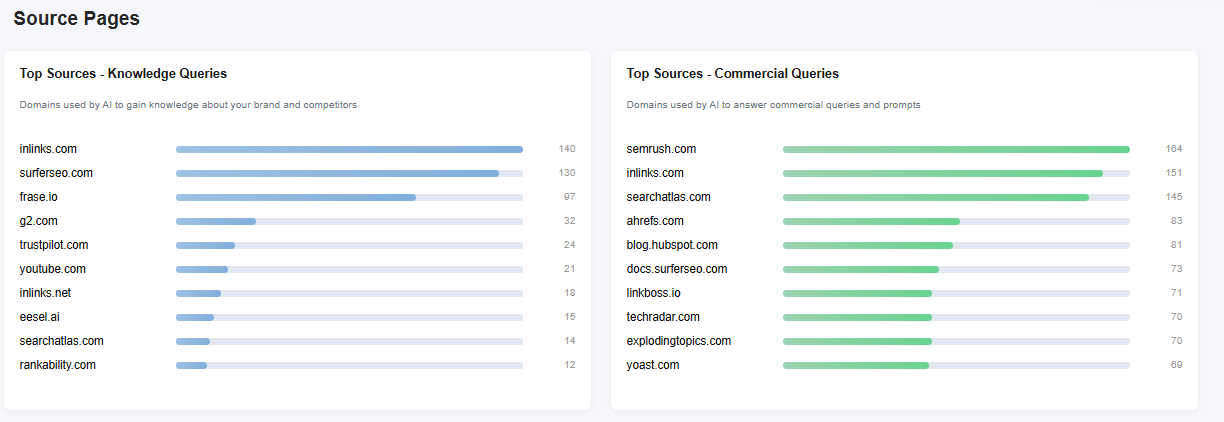
When a model answers a question, it is usually quoting somebody. Waikay records who. The left-hand list is the sources models used to learn about a brand; the right-hand list is who they cite when a user is close to buying. They are rarely the same sites, which is the useful part.
For digital PR and link building
For an agency that sells digital PR or link building this is a ready-made target list. You can stop guessing which publications matter in a client’s sector and start with the ones the models already lean on. Collect it from the first audit onwards and after six months you will have a sector-by-sector citation database that no competitor agency can buy.
Step 05
Sell a technical fix with an actual deliverable: EntityMap
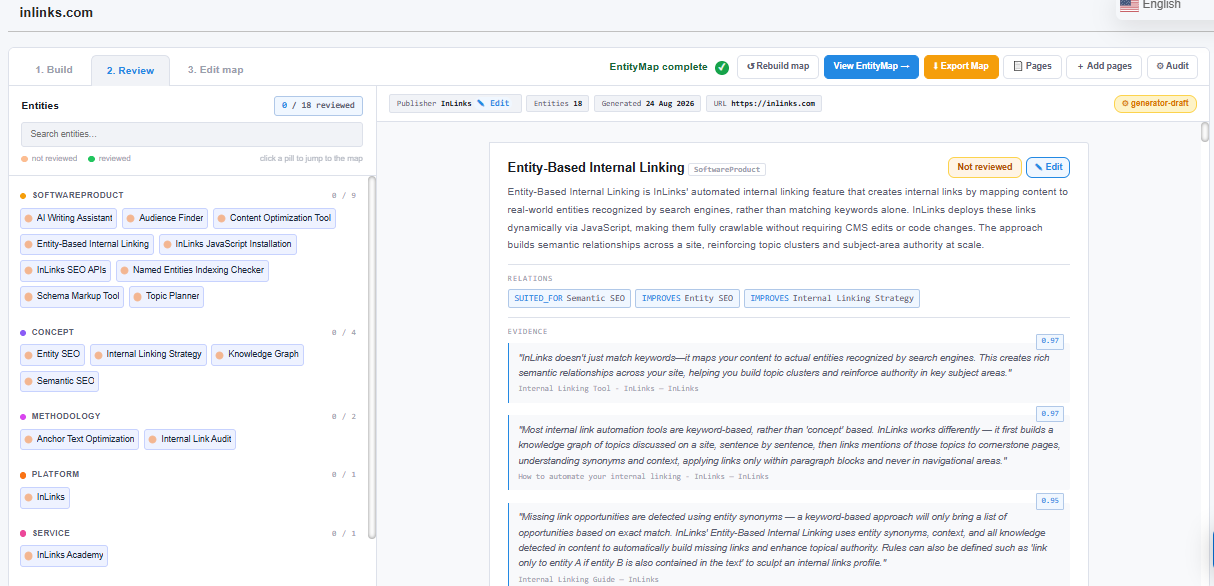
A business can publish hundreds of good pages and still be misunderstood by AI, because the facts about its products, people and expertise are scattered across the site with nothing connecting them. EntityMap is the open standard our founders wrote to fix that: a single machine-readable file that tells AI systems what the entities on a site are, how they relate, and where the evidence is.
Why it sells
For agencies the appeal is simple. Most “AI optimisation” retainers are a vague promise. An EntityMap implementation is a scoped project with a file at the end of it and a before-and-after you can measure in Waikay. You can learn the specification and build maps yourself, or use the Entity Map Manager shown above (available on request for individual projects), or hand the whole thing to our managed service and resell it.
Step 06
Prove it moved, every month
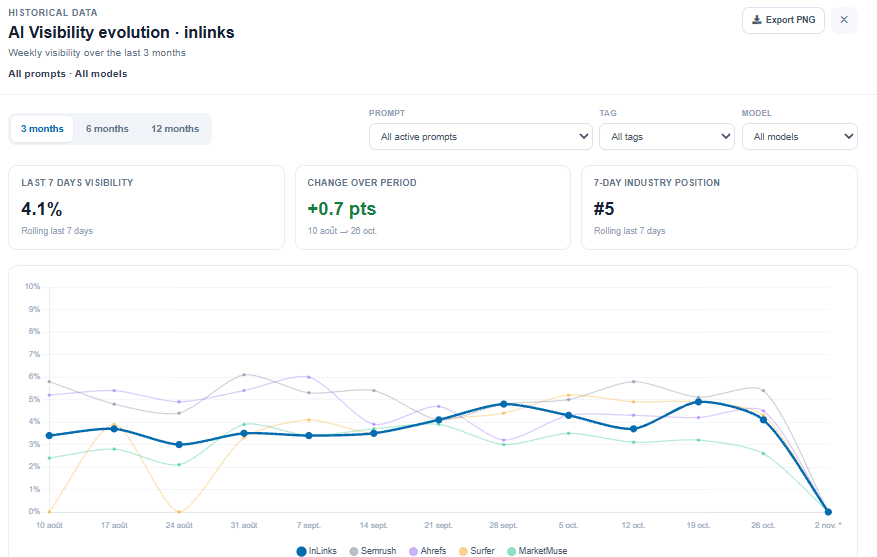
The chart above is not a flattering one, and that is deliberate. InLinks appears in 4.1% of AI answers across the prompts we track, up a seventh of a point, fifth in a field of five. That is what honest AI visibility data looks like for most brands right now, and it is exactly why clients will pay you to improve it.
Prompt tracking records how often the client appears in answers to the questions their customers actually ask, across every model, against every competitor you name. Tag prompts by product, market or stage of the funnel and the Share of Voice chart re-cuts itself; you do not build a separate report for each perspective.
The monthly report
For the monthly report you have three options. Use Waikay’s own dashboards and export the charts. Pull the data into Google Sheets through the API. Or point an AI assistant such as Claude at the MCP server and let it write the first draft of the commentary. API and MCP access are included from the $69.95 plan upwards.
What Waikay does not do
Clearer to say it here than to have you discover it on day three.
✍️
It does not write content.
It tells you what to write and why. Your writers, or your AI tooling, do the rest.
🛠️
It does not change the client’s site.
Fixes, schema and EntityMap files are deployed by you or the client’s developers.
🔁
Its numbers will not match a logged-in ChatGPT session.
Waikay queries the models through their APIs for neutral, repeatable answers. A consumer’s desktop session is shaped by their history and location. We think repeatable is the one you want to report on; be ready to explain the difference.
🎨
It is not the prettiest tool in the category.
We have spent the money on depth rather than polish. The charts are export-ready; the rest of the interface is for people who work in it every day.The unglamorous bits that matter when you run an agency
None of these will make the pitch deck. All of them will come up in month two.
📁
One project per client, as many as you need
Every brand gets its own project with its own prompts, competitors, reports and credit history. Unlimited projects from the $69.95 plan.
👥
Seats for the whole team
Two seats on Small Teams, unlimited on Large Teams and above. Add the account manager, the writer and the freelancer without a licensing conversation.
👀
Clients can look but not touch
Invite a client as a Guest on their own project. They see the live reports and nothing else, and they cannot change your configuration.
🧮
Credits you can see and budget
One credit creates or refreshes a Brand Overview or Topic Report. Prompt tracking costs vary with how many models you watch and how often. Credit use is shown per project, so you can tell which client is costing what, and price accordingly.
📦
Credit packs for one-off work
A pitch, a due-diligence audit or a quarterly deep-dive does not need a bigger subscription. Buy 40 or 80 report credits as a pack and use them on any project.
🎛️
Monitor what matters, not everything
Choose the prompts, the models, the method (API or scraped) and the frequency (daily, every two days, weekly) per client. A local plumber does not need daily tracking across four models.
🔄
Change plan when the client list changes
Win a client, upgrade today. Lose one, downgrade next month. No account manager, no annual lock-in.
🔌
Take the data elsewhere
API endpoints for overview, rankings and sources, plus a read-only MCP server for AI assistants. Build your own dashboards if ours are not to your taste.What it costs
All prices are public and self-serve. There is no “contact sales” gate until you want an enterprise agreement.
| Plan | Per month | What you get |
|---|---|---|
| Free | $0 | 3 credits that do not renew. Enough to audit one prospect properly. |
| Early Adopter | $24.95 | Every tool, 8 credits a month, one user. |
| Small Teams | $69.95 | 30 credits, up to 120 tracked prompts, 2 seats, unlimited projects, API and MCP access. |
| Large Teams | $199.95 | 90 credits, up to 360 prompts, unlimited seats, team training. |
| Bigger Projects | $449.95 | 220 credits, up to 880 prompts, account set-up consultancy. |
| Extra credits | $99.95 / $189.95 | Top-up packs of 40 or 80 reports when a one-off project needs them. No plan change required. |
A worked example
An agency on the $199.95 plan with twelve clients has 90 credits a month. That is roughly four report refreshes per client plus a handful of spare audits for prospects, with prompt tracking configured on top to taste. Charge each client a few hundred a month for the AI visibility line on their retainer and the maths takes care of itself.
How to start this week
1
Open a free account.
You get three credits; they do not expire.2
Pick the client you most expect to ask about AI.
Run a Brand Overview (one credit) and a Topic Report on their main service (one credit).3
Open the Fact Tracker and review the claims.
Screenshot the three worst.4
Put the score, the ranking and the three screenshots into an email.
Send it. Offer a 30-minute call to walk through the rest.5
When they say yes, upgrade to the plan that fits the client count and set up prompt tracking so you have a baseline before any work starts.
If step four does not produce a reply, the prospect was not going to buy AI optimisation from anyone. You have spent $3 finding that out.
Questions agencies actually ask
No. Prompt tracking is step six of six. The audit, the fact checking, the topic gap analysis, the source data and EntityMap are the parts that give you something to sell before there is anything to track.
ChatGPT, Gemini, Claude and Sonar (Perplexity). Reports are available in 47 languages across more than 100 countries, so a client in Madrid is measured against what Spanish-speaking users see.
You can export charts and action plans as PDF or PNG and drop them into your own templates, share read-only links, or pull the raw data through the API into your own dashboards. There is no white-labelled login at present.
It is a benchmarking choice for that report type, to keep the comparison legible. Prompt tracking and Share of Voice surface every competing brand the models mention, with no cap.
It means that model did not mention the brand for that topic at all. That is not a bug; it is the finding. Usually it is the most persuasive slide in the deck.
The free tier audits one prospect. The $24.95 plan runs eight reports a month. If you cannot turn eight AI audits into one new conversation, the problem is not the software.
Stop tracking AI visibility. Start selling the fix.
Every one of your clients is already being described by AI, accurately or otherwise. Waikay shows you what is being said, which parts are wrong, who the models trust instead, and whether your work changed any of it. The rest is agency work you already know how to do.